
Steps
- Open Meetings. Under To file, select Log outcome on the meeting. Or open it from Past or the calendar.
- Check About, the record it was about. Choose one if it’s empty.
- Pick an Outcome. The choices follow the meeting’s type.
- Add what was said under “What was said? (optional)”, and + Follow-up for a task with a due date.
- For a meeting about an application, pick the stage change: Move <name> to <stage>, Keep in stage or Reject with a reason.
- Select Save outcome, or press ⌘ ↵.
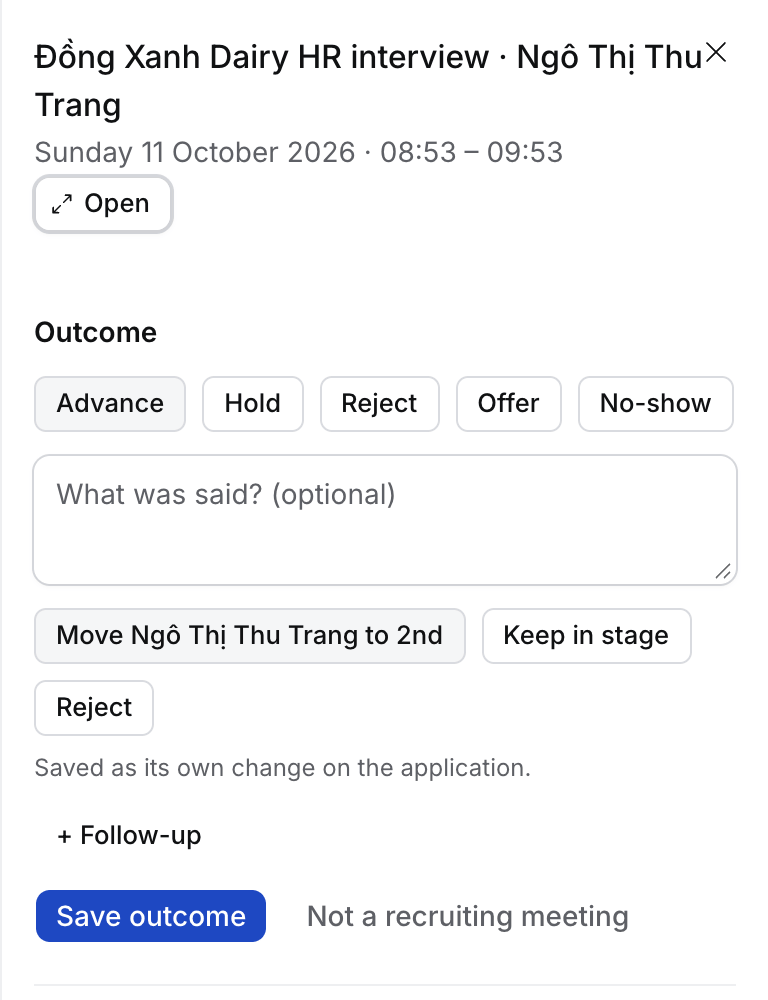
The outcomes by type
What happens next
- Hire says “Outcome saved”, with the stage move and task it made. Undo reverses the stage change.
- The note goes on the record and on each attendee you have in Hire.
- For a recorded call, Flo usually proposes the outcome itself. Approving its card files the meeting. See How to file a recording.
Troubleshooting
- Not a recruiting meeting. Select Not a recruiting meeting on the row under To file or on the meeting, and it stops asking. Undo on the message, or Ask again on the meeting, undoes that. A meeting with only colleagues or people on your agency’s own domains never asks.
- “This meeting has not started yet”. Log the outcome once it starts.
- It’s no longer in To file. Only meetings that ended in the last 7 days wait there. Open older ones from Past.