
Steps
- Open Companies and select Add company. A new row opens with Company name.
- Type at least two letters. Pick a company from In Hire if it’s already yours, from Suggestions to take its name and website, or Add ”…” to keep what you typed.
- Press Enter. When the company has a website, Hire fills its empty fields and says what it filled, with Undo. While it works, Details says Filling from acme.com…. Its logo shows beside the name on the company’s page and in every list.
Fill an existing company
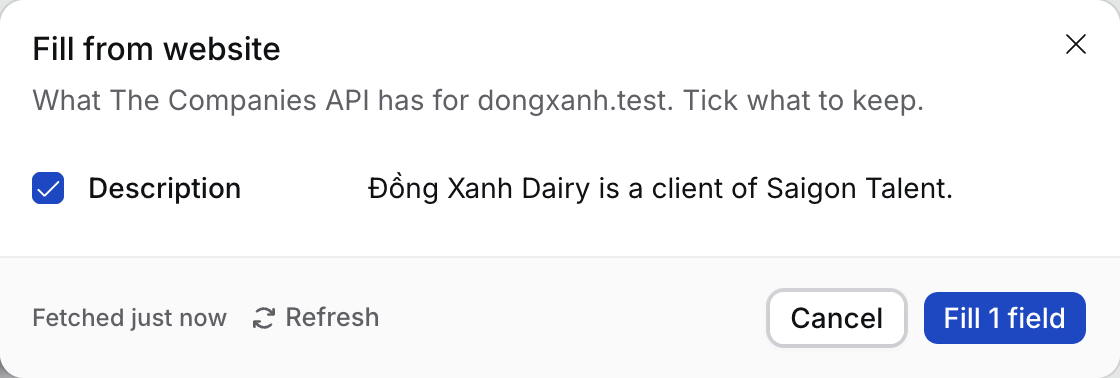
- Open the company, open ⋯ and select Fill from website. With no website on file, select Find website there first.
- Tick the fields to keep. HQ country, HQ city and Employees say Check this and start unticked.
- Select Fill N fields.
What happens next
- Each lookup is kept for 30 days. Refresh looks the company up again and uses a new lookup.
- Your agency has 500 lookups every 30 days. Owners and Admins see how many are left in Settings › General › Company lookups.
Troubleshooting
- “This looks like a different company”. The website’s company has another name. Nothing is ticked, so check before you fill.
- Lookups are running low. Settings warns from 80% used. Fill from website waits until the date it shows.
- The button is greyed out. The company is archived. Restore it first.
- “The website’s domain, gmail.com, is a personal mail domain”. Gmail, Outlook, Yahoo and other personal mailbox domains are never a company’s website, whether you add the company, import it or Flo suggests it. Use the company’s own website.
Related
- How to track a target company
- How to find and merge duplicates
- ”… already has the website …”. Hire keeps one company per website domain, and a subdomain counts as the same domain: hire.skillflo.ai belongs to skillflo.ai. Open the company it names instead.
- ”… has the same website domain”. Two companies were added before Hire checked subdomains. Open the older one and select Merge to move the other’s contacts, targets and activity into it.