
Before you start
- Echo and your calendar are connected. See Connect Echo.
- The client Company and the person you’re talking to are in Hire as a Contact.
- The calendar event reads as a client briefing, for example “Briefing: Senior PM, Payments - Zippa”. Hire types a meeting from its title and who is invited.
- The Rule New job from a briefing is on. It is on by default. See How Mail sorting work.
Steps
- Run the call with Echo recording.
- When Echo finishes its notes, usually within a minute, Flo reads the call. A card waits in Tasks › To review and on Today, grouped as After the call: <meeting>. It reads, for example, New job: Senior Product Manager, Payments at Zippa · “Hiring manager with me, then a product case, then the VP.”
- Select the row to see everything Flo read and the quote behind each part. To change a value, open it in Tasks › To review and select Edit, then Approve with changes.
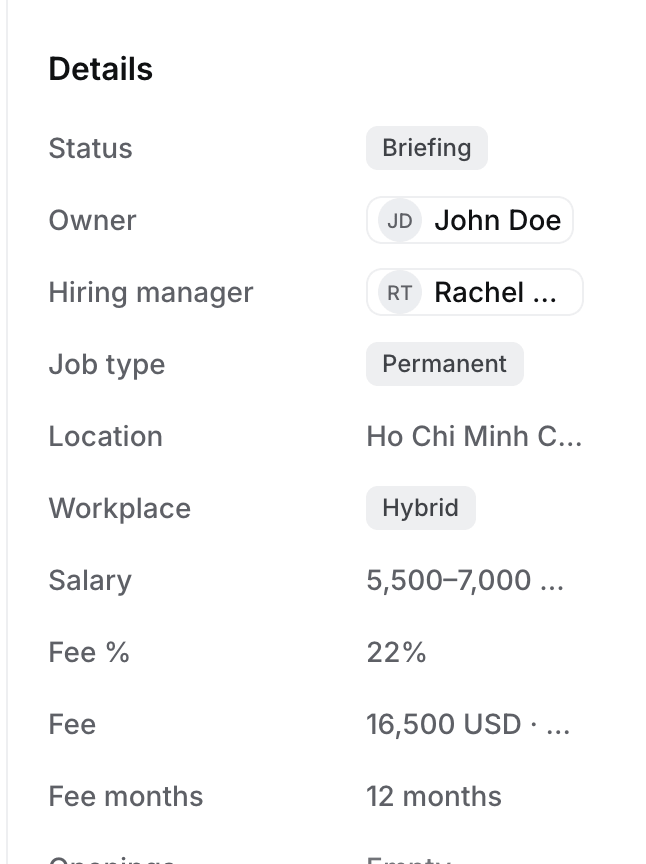
- Select Approve. Hire creates the Job in Briefing, with you as its owner.
What happens next
- The Job holds the salary, Fee %, location, workplace and rounds from the call, and the must-haves in its brief. The hiring manager is set only when the name matches a Contact at the client.
- An Outcome card from the same call files the meeting. Approve it to move the meeting to Done.
- Write and confirm the ideal candidate next. See How to confirm the ideal candidate.
Troubleshooting
- The client already has a live Job. Flo proposes no new Job. The meeting asks Which job is this about? with each live Job, and the likeliest one marked Suggested. Select This job on the right one, and Update the Job from client calls proposes changes to that Job instead.
- No card came. Check on Meetings that the meeting shows as a client briefing and that Echo filed it there. Open it and select Ask Flo to read it to have Flo read it again.