> ## Documentation Index
> Fetch the complete documentation index at: https://docs.ascern.io/llms.txt
> Use this file to discover all available pages before exploring further.
# How to set rounds and fee
> Set a Job's interview rounds, CV target and fee in its Details panel.
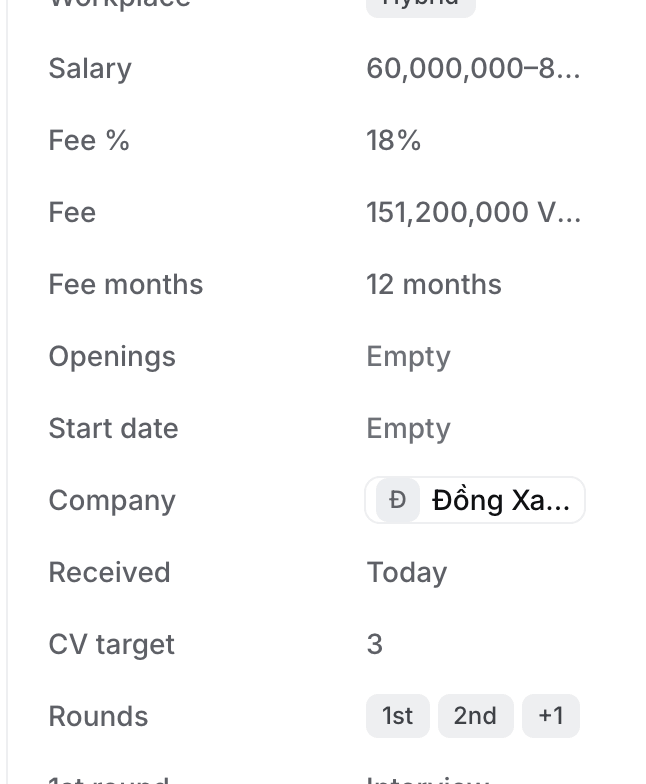
A Job's rounds become the stages its candidates move through after CV sent, and its fee is what you invoice when you place someone. Both live in the **Details** panel on the Job.
## Before you start
You can edit the Job: you own it, you manage its owner, or you're an Owner or Admin. Everyone else sees Details read-only.
## Steps
1. Open the Job on its **Overview** tab. **Details** is on the right. It's hidden on Pipeline, Find candidates and Job description, and while Flo's panel is open.
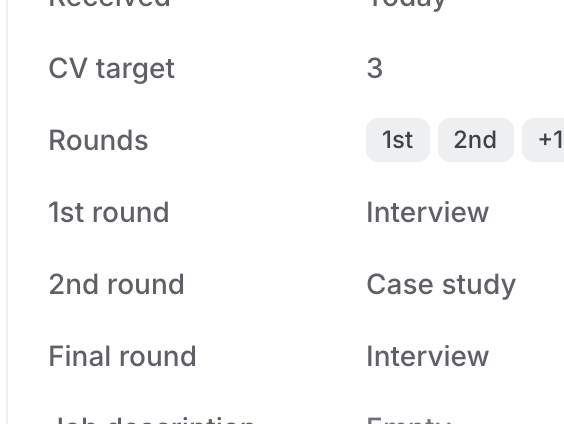
2. Select **Rounds** and pick the rounds in order, for example **1st**, **2nd**, **Final**. The options are 1st, 2nd, 3rd, 4th, Final and Test.
3. Under Rounds, each round has its own row, for example **2nd round**. Select it and pick **Interview**, **Group interview** or **Case study**. A new round is an Interview.
4. Set **CV target**, how many CVs you plan to send the client.
5. Set **Fee %**. Hire works out **Fee** from the salary: a monthly salary × **Fee months** × Fee %, or a yearly salary × Fee %. A salary range uses its midpoint.
6. For a fixed fee, type the amount in **Fee** instead. It then reads "set by hand". Clear it to go back to the formula.
 ## What happens next
* The Job's board columns run Application, Long list, Short list, Outreach, Interview, CV sent, then your rounds, then Offer and Placed.
* The rounds are the columns on **CCM**, where you track every candidate the client is interviewing.
* A booked CCM's prep task names the round's format, for example "Prep Nam Lê for the Masan 2nd round (case study)". See [How to follow candidates at the client on CCM](/guides/how-to/track-interviews-on-ccm).
* A briefing call can propose rounds, their formats, CV target and fee months on a card. They change only when you approve it.
## Related
* [How to create a job from a client briefing call](/guides/how-to/create-a-job-from-a-briefing-call)
* [How to open, close and reopen a job](/guides/how-to/open-close-and-reopen-a-job)
This documentation is built and hosted on [Mintlify](https://mintlify.com), a developer documentation platform.
## What happens next
* The Job's board columns run Application, Long list, Short list, Outreach, Interview, CV sent, then your rounds, then Offer and Placed.
* The rounds are the columns on **CCM**, where you track every candidate the client is interviewing.
* A booked CCM's prep task names the round's format, for example "Prep Nam Lê for the Masan 2nd round (case study)". See [How to follow candidates at the client on CCM](/guides/how-to/track-interviews-on-ccm).
* A briefing call can propose rounds, their formats, CV target and fee months on a card. They change only when you approve it.
## Related
* [How to create a job from a client briefing call](/guides/how-to/create-a-job-from-a-briefing-call)
* [How to open, close and reopen a job](/guides/how-to/open-close-and-reopen-a-job)
This documentation is built and hosted on [Mintlify](https://mintlify.com), a developer documentation platform.