> ## Documentation Index
> Fetch the complete documentation index at: https://docs.ascern.io/llms.txt
> Use this file to discover all available pages before exploring further.
# How to set a daily BD calls target
> Give each consultant a number of BD calls a day and see it on Today and the Dashboard.
Phil's BD training sets a minimum of 10 BD calls a day. Owners, Admins and Managers set it in Settings, and each consultant sees the day's count on Today.
## Steps
1. Open **Settings › Targets**.
2. Type a number under **BD calls a day** on a row: the Agency's row sets it for each consultant, a Team's row for each consultant on that Team, and a person's row for that person only.
3. Press Enter or leave the field. Hire saves it and the change applies from today.
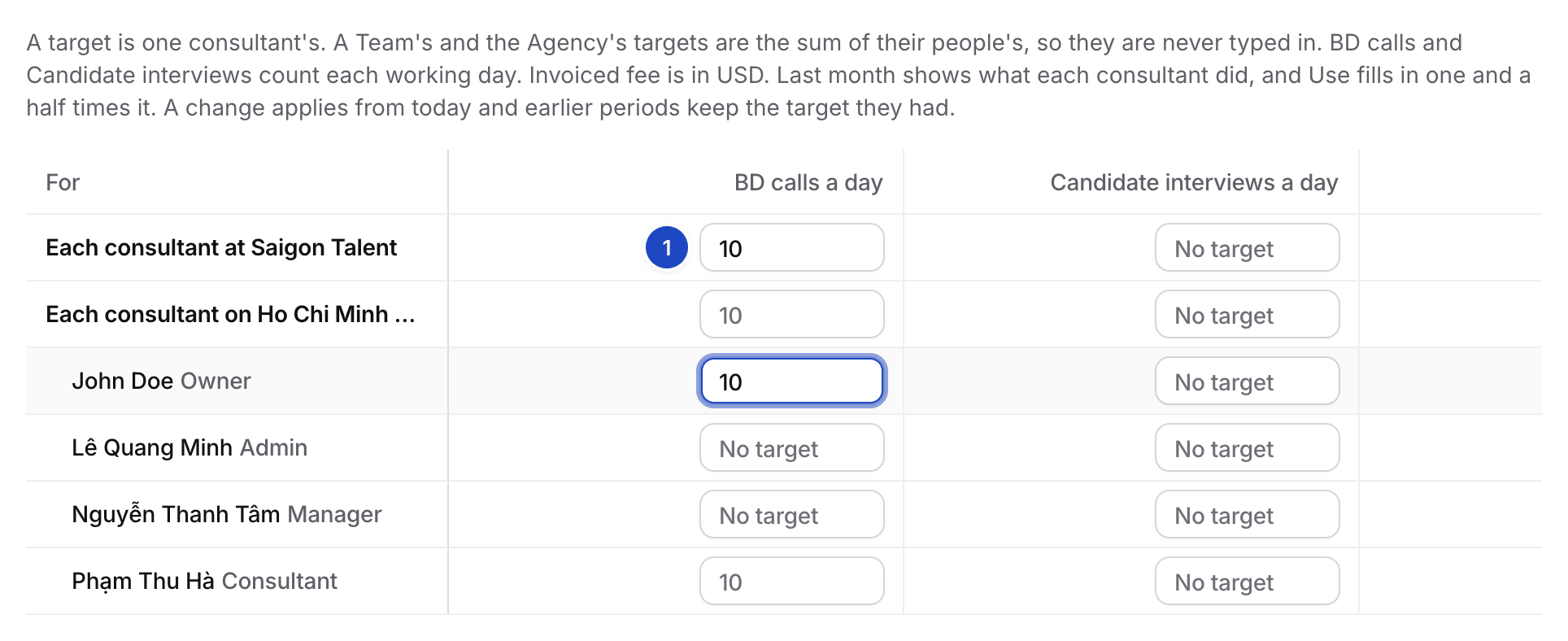 **Candidate interviews a day** works the same way, and **Placements a month** counts the month. A Manager sets targets only for their own Team and its Consultants.
## Raise a target from last month
Phil's training raises each month's target to last month's figure plus 50%. On each consultant's row, Hire shows what they did last month and the raised number: **Last month 6 · Use 9**.
1. Select **Use 9**. Hire puts 9 in the field and saves nothing yet.
2. Press Enter to save it, or type another number.
## What happens next
* **Today** shows the line "4 of 10 BD calls today", with the interviews count when that target is set. **Log call** opens Log activity (⌘ E), and **Targets** opens your target companies.
* A call you log on a Company, Contact or Target counts. A call logged on a Job doesn't.
* Daily targets count Monday to Friday. On a Saturday or Sunday the line shows the count alone. On the Dashboard's **Week**, the KPI sheet reads the target as "5 days × 10 = 50".
**Candidate interviews a day** works the same way, and **Placements a month** counts the month. A Manager sets targets only for their own Team and its Consultants.
## Raise a target from last month
Phil's training raises each month's target to last month's figure plus 50%. On each consultant's row, Hire shows what they did last month and the raised number: **Last month 6 · Use 9**.
1. Select **Use 9**. Hire puts 9 in the field and saves nothing yet.
2. Press Enter to save it, or type another number.
## What happens next
* **Today** shows the line "4 of 10 BD calls today", with the interviews count when that target is set. **Log call** opens Log activity (⌘ E), and **Targets** opens your target companies.
* A call you log on a Company, Contact or Target counts. A call logged on a Job doesn't.
* Daily targets count Monday to Friday. On a Saturday or Sunday the line shows the count alone. On the Dashboard's **Week**, the KPI sheet reads the target as "5 days × 10 = 50".
 ## Related
* [How to track a target company](/guides/how-to/track-a-target-company)
* [How to log activity](/guides/how-to/log-activity)
This documentation is built and hosted on [Mintlify](https://mintlify.com), a developer documentation platform.
## Related
* [How to track a target company](/guides/how-to/track-a-target-company)
* [How to log activity](/guides/how-to/log-activity)
This documentation is built and hosted on [Mintlify](https://mintlify.com), a developer documentation platform.