> ## Documentation Index
> Fetch the complete documentation index at: https://docs.ascern.io/llms.txt
> Use this file to discover all available pages before exploring further.
# How to send a CV to a client
> Pick who is ready for a job, check their CVs and emails, then mark the CVs sent.
Use this after an interview, once you've decided who to put forward. Flo fills four steps for the whole job: who to send, their CVs, their emails and what happens when you approve. You check and change any of them. Hire never sends anything for you.
1. Open the job and select **CV out**. From a candidate's application page, select **Prepare CV out**: Flo picks only that candidate, and you can tick others on the same job.
2. **Pick candidates.** Everyone on the job's Short list, in Outreach or at Interview is listed with Flo's reason. **Ready** shows what the email is written from. **Left out** shows what's missing, with its fix (see below). Flo ticks everyone who is ready. Untick anyone you don't want to send. A candidate becomes ready, and ticked, as soon as you fix their last line.
3. **Format CV.** One CV per ticked candidate. Select **Open** to change any line before it goes.
4. **Draft the email.** One email per candidate. With Gmail connected and an email on the job's hiring manager, each email is already in **Inbox › Needs reply** and your Gmail Drafts. Select **Open in Inbox** to edit or send it, or **Copy email** to paste it elsewhere.
5. Send each email with its CV attached. In the Inbox, **Send and remind me** sends it and brings the conversation back to **Needs reply** if the client hasn't replied in a few working days.
6. **Approve.** Select **Mark as sent**. For each candidate, Flo suggests the move to **CV sent** and a Task to chase the client for feedback in 2 working days. Untick the Task if you don't want it, then approve.
Each step says **Filled by Flo** until you change it, then **Edited by you**. **Approve** turns to **Approved** once you've decided Flo's suggestions.
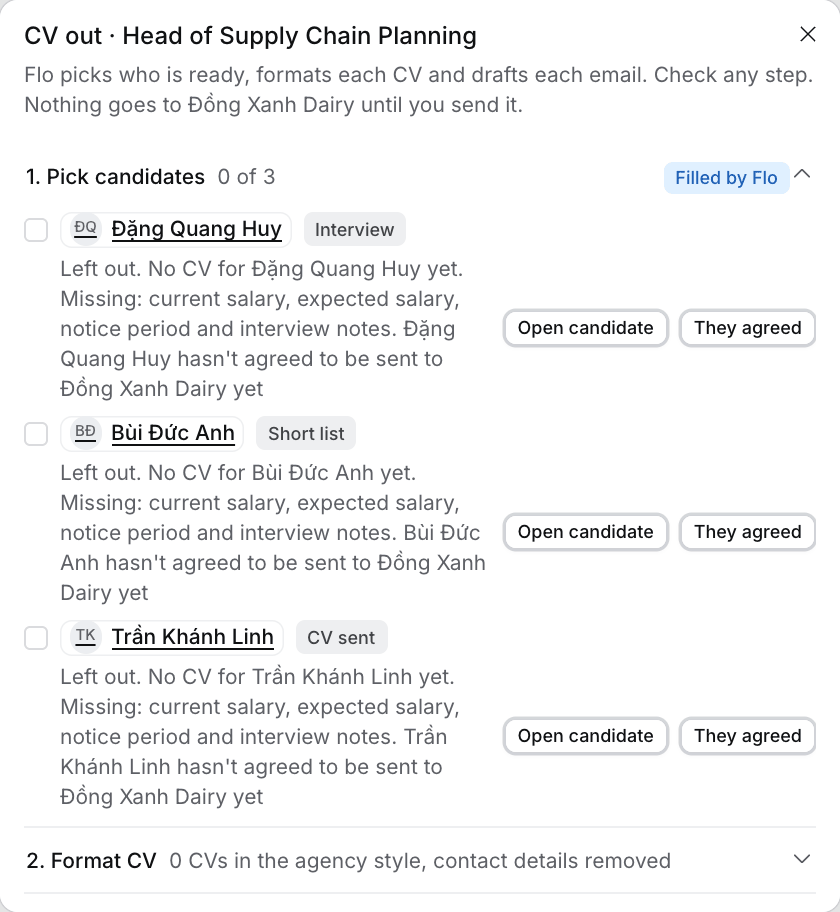 ## The three lines
| Line | It's ticked when | If it isn't |
| - | - | - |
| CV formatted in the agency style, contact details removed | The application has a CV in your house style. Otherwise it reads "CV not formatted yet", or "No CV for \ yet" | Select **Format CV**. With no CV on file, select **Open candidate** and upload one on their Files tab |
| Salary, notice period and interview notes | The candidate has a current salary, an expected salary and a notice period, and there are notes or a transcript from a call with them. Otherwise it reads "Missing:" and what's missing | Select **Open candidate** to fill in the missing values. Log the interview call with [Log activity](/guides/how-to/log-activity), or add the call's transcript to its meeting |
| \ agreed to be sent to \ | You recorded that they agreed to be put forward to this client. Otherwise it reads "hasn't agreed to be sent … yet" | Select **They agreed** once they have. **Undo** clears it |
## What Flo writes
* **The CV.** Your default CV template ([Format a CV](/guides/how-to/format-a-cv)). Select **Open** to review it and switch template. A CV made for an application never shows the candidate's email, phone or LinkedIn, so the client comes back to you.
* **The email.** In your house tone. It uses the job description, the interview notes and the CV, with three or four points of evidence, then current salary, expected salary and notice period. Your sign-off and name come from Settings.
## What happens next
* **CV sent waits for you.** **Mark as sent** never moves the stage by itself. Approving the card moves the application to **CV sent**, which counts toward the job's CVs sent.
* **One chase Task.** If your **CV sent, chase the client** Rule is on, the Rule makes the chase Task, so Flo doesn't suggest a second one. Flo also leaves the Task out when the application already has an open Task or a chase Task waiting for your approval. You can approve the move and the Task in either order.
* **Your edits stay.** Opening CV out again shows the email in your Inbox as you left it.
* **When Flo can't write an email.** The candidate stays picked, and **Approve** names them and says why. Open CV out again to retry.
* **Do not contact.** When the job's hiring manager or the client company is marked **Do not contact**, Flo writes no email, so there's nothing to copy and **Mark as sent** stays off. **Approve** names the candidate and says who is marked, for example "Hoa Tran is marked Do not contact".
* **Agreement from a call.** When you log a call or file a meeting where the candidate says yes to being sent, Flo proposes **They agreed** on a card for you to approve.
* **Ask Flo.** On the application, ask Flo to prepare the CV out. It runs the same check and asks you for whatever is missing.
This documentation is built and hosted on [Mintlify](https://mintlify.com), a developer documentation platform.
## The three lines
| Line | It's ticked when | If it isn't |
| - | - | - |
| CV formatted in the agency style, contact details removed | The application has a CV in your house style. Otherwise it reads "CV not formatted yet", or "No CV for \ yet" | Select **Format CV**. With no CV on file, select **Open candidate** and upload one on their Files tab |
| Salary, notice period and interview notes | The candidate has a current salary, an expected salary and a notice period, and there are notes or a transcript from a call with them. Otherwise it reads "Missing:" and what's missing | Select **Open candidate** to fill in the missing values. Log the interview call with [Log activity](/guides/how-to/log-activity), or add the call's transcript to its meeting |
| \ agreed to be sent to \ | You recorded that they agreed to be put forward to this client. Otherwise it reads "hasn't agreed to be sent … yet" | Select **They agreed** once they have. **Undo** clears it |
## What Flo writes
* **The CV.** Your default CV template ([Format a CV](/guides/how-to/format-a-cv)). Select **Open** to review it and switch template. A CV made for an application never shows the candidate's email, phone or LinkedIn, so the client comes back to you.
* **The email.** In your house tone. It uses the job description, the interview notes and the CV, with three or four points of evidence, then current salary, expected salary and notice period. Your sign-off and name come from Settings.
## What happens next
* **CV sent waits for you.** **Mark as sent** never moves the stage by itself. Approving the card moves the application to **CV sent**, which counts toward the job's CVs sent.
* **One chase Task.** If your **CV sent, chase the client** Rule is on, the Rule makes the chase Task, so Flo doesn't suggest a second one. Flo also leaves the Task out when the application already has an open Task or a chase Task waiting for your approval. You can approve the move and the Task in either order.
* **Your edits stay.** Opening CV out again shows the email in your Inbox as you left it.
* **When Flo can't write an email.** The candidate stays picked, and **Approve** names them and says why. Open CV out again to retry.
* **Do not contact.** When the job's hiring manager or the client company is marked **Do not contact**, Flo writes no email, so there's nothing to copy and **Mark as sent** stays off. **Approve** names the candidate and says who is marked, for example "Hoa Tran is marked Do not contact".
* **Agreement from a call.** When you log a call or file a meeting where the candidate says yes to being sent, Flo proposes **They agreed** on a card for you to approve.
* **Ask Flo.** On the application, ask Flo to prepare the CV out. It runs the same check and asks you for whatever is missing.
This documentation is built and hosted on [Mintlify](https://mintlify.com), a developer documentation platform.