> ## Documentation Index
> Fetch the complete documentation index at: https://docs.ascern.io/llms.txt
> Use this file to discover all available pages before exploring further.
# How to find and merge duplicates
> Merge records for the same person or company into one, keeping every history, and undo a merge.
Merge the duplicates of a person or company into the record you keep. Everything linked to them moves across. You need to be an Owner, Admin or Manager.
## Merge people
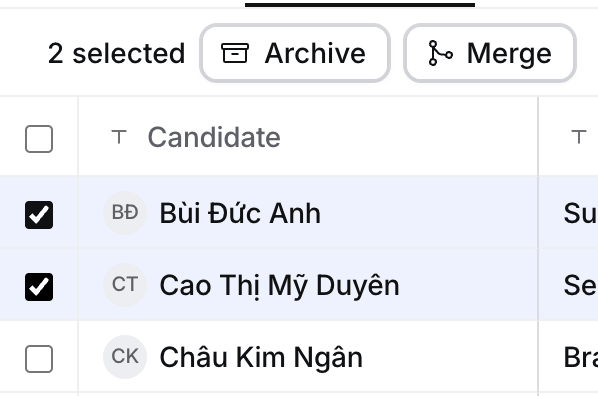
On **Contacts** or **Candidates**, tick two or more rows for the same person, then select **Merge**.
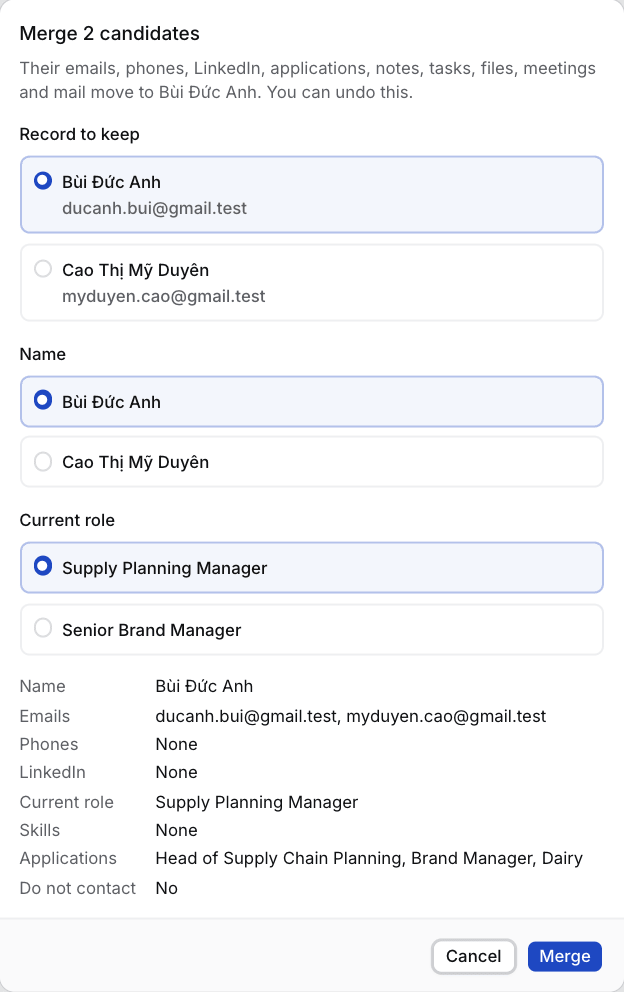
 Pick the **Record to keep** (for candidates, the oldest) and the name or role where they differ, then select **Merge**. Hire says **Merged into name** with **Undo**.
 From a record, select **⋯** › **Merge with…** and search for the duplicate.
## Merge companies
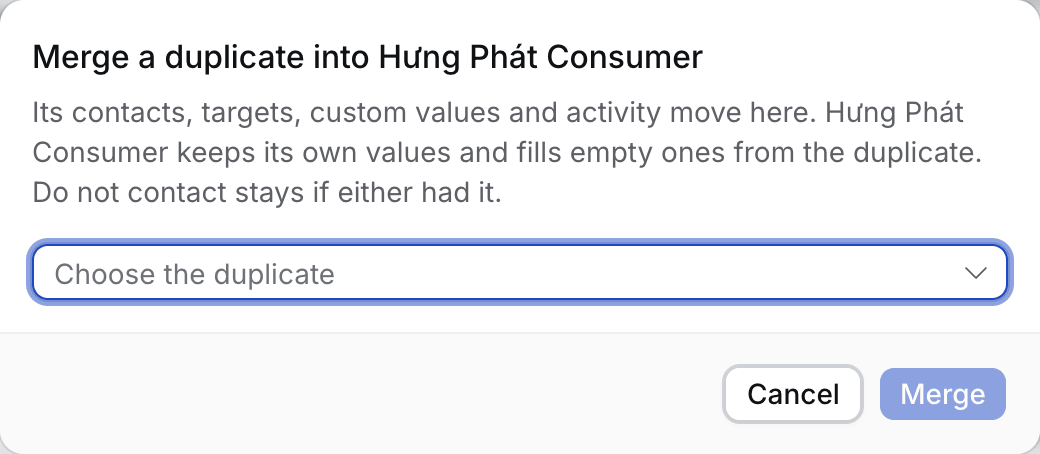
Select **⋯** › **Merge a duplicate into this company**, choose the duplicate, then **Merge**. Or tick both on **Companies** and select **Merge**. Hire says **Merged into name** with **Undo**.
From a record, select **⋯** › **Merge with…** and search for the duplicate.
## Merge companies
Select **⋯** › **Merge a duplicate into this company**, choose the duplicate, then **Merge**. Or tick both on **Companies** and select **Merge**. Hire says **Merged into name** with **Undo**.
 ## What moves and what stays
| | People | Companies |
| - | - | - |
| **Moves** | Emails, phones, LinkedIn, skills, applications, placements, notes, tasks, files, meetings, mail | Contacts, targets, Jobs, notes, activity |
| **Kept values** | The record you keep, plus your choices | The kept company's, with empty fields filled |
| **Undo** | Yes. A field changed since keeps the later change | Yes. The company gets back its contacts, targets, Jobs and website |
**Do not contact** stays if either record had it. The same job applied to twice keeps the kept candidate's application and archives the other. The kept person's primary email and phone stay primary; the other person's are added after them.
## If something looks wrong
* **Merge is greyed out.** The record or its company is archived. Restore it first.
* **Undo says to undo the later merge first.** The kept person or company was merged again since. Undo that one first.
* **Archiving a company asks "Merge into it instead?"** It looks like a duplicate. **Merge** is the default, **Archive anyway** archives it.
* **An old link opens another record.** It belonged to a merged person and opens the record you kept.
This documentation is built and hosted on [Mintlify](https://mintlify.com), a developer documentation platform.
## What moves and what stays
| | People | Companies |
| - | - | - |
| **Moves** | Emails, phones, LinkedIn, skills, applications, placements, notes, tasks, files, meetings, mail | Contacts, targets, Jobs, notes, activity |
| **Kept values** | The record you keep, plus your choices | The kept company's, with empty fields filled |
| **Undo** | Yes. A field changed since keeps the later change | Yes. The company gets back its contacts, targets, Jobs and website |
**Do not contact** stays if either record had it. The same job applied to twice keeps the kept candidate's application and archives the other. The kept person's primary email and phone stay primary; the other person's are added after them.
## If something looks wrong
* **Merge is greyed out.** The record or its company is archived. Restore it first.
* **Undo says to undo the later merge first.** The kept person or company was merged again since. Undo that one first.
* **Archiving a company asks "Merge into it instead?"** It looks like a duplicate. **Merge** is the default, **Archive anyway** archives it.
* **An old link opens another record.** It belonged to a merged person and opens the record you kept.
This documentation is built and hosted on [Mintlify](https://mintlify.com), a developer documentation platform.