> ## Documentation Index
> Fetch the complete documentation index at: https://docs.ascern.io/llms.txt
> Use this file to discover all available pages before exploring further.
# How to add a company and fill it from its website
> Add a client or prospect, then let Hire fill its industry, size and location from its website.
Type a company's name and Hire suggests the real company, with its website. From the website, Hire fills the rest: description, industry, LinkedIn, founding year, headquarters and size.
## Steps
1. Open **Companies** and select **Add company**. A new row opens with **Company name**.
2. Type at least two letters. Pick a company from **In Hire** if it's already yours, from **Suggestions** to take its name and website, or **Add "…"** to keep what you typed.
3. Press Enter. When the company has a website, Hire fills its empty fields and says what it filled, with **Undo**. While it works, **Details** says **Filling from acme.com…**. Its logo shows beside the name on the company's page and in every list.
Hire fills a company the same way when you approve it in **People we found**, when Flo adds it, and when you give it a website. It fills only empty fields, never one you typed, and only when the website's company has a matching name.
## Fill an existing company
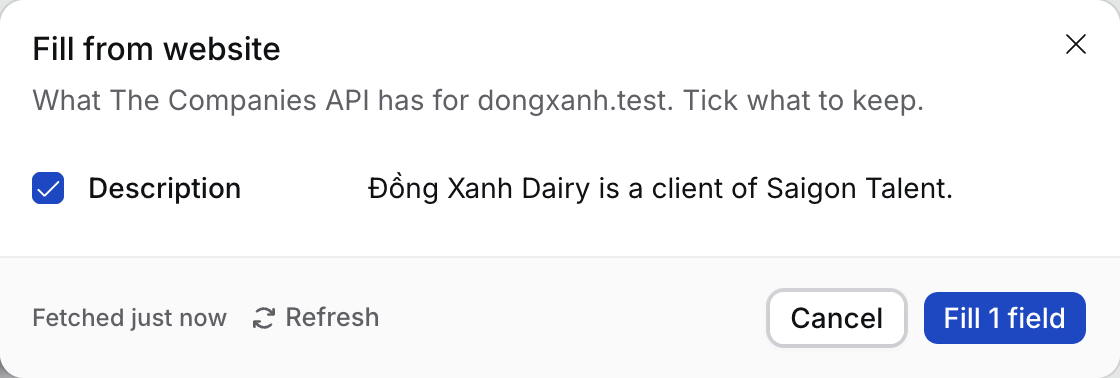
1. Open the company, open **⋯** and select **Fill from website**. With no website on file, select **Find website** there first.
2. Tick the fields to keep. **HQ country**, **HQ city** and **Employees** say **Check this** and start unticked.
3. Select **Fill N fields**.
 To fill several at once, tick them on **Companies** and select **Fill from website** in the bar.
## What happens next
* Each lookup is kept for 30 days. **Refresh** looks the company up again and uses a new lookup.
* Your agency has 500 lookups every 30 days. Owners and Admins see how many are left in **Settings › General › Company lookups**.
## Troubleshooting
* **"This looks like a different company".** The website's company has another name. Nothing is ticked, so check before you fill.
* **Lookups are running low.** Settings warns from 80% used. Fill from website waits until the date it shows.
* **The button is greyed out.** The company is archived. Restore it first.
* **"The website's domain, gmail.com, is a personal mail domain".** Gmail, Outlook, Yahoo and other personal mailbox domains are never a company's website, whether you add the company, import it or Flo suggests it. Use the company's own website.
## Related
* [How to track a target company](/guides/how-to/track-a-target-company)
* [How to find and merge duplicates](/guides/how-to/find-and-merge-duplicates)
* **"… already has the website …".** Hire keeps one company per website domain, and a subdomain counts as the same domain: hire.skillflo.ai belongs to skillflo.ai. Open the company it names instead.
* **"… has the same website domain".** Two companies were added before Hire checked subdomains. Open the older one and select **Merge** to move the other's contacts, targets and activity into it.
This documentation is built and hosted on [Mintlify](https://mintlify.com), a developer documentation platform.
To fill several at once, tick them on **Companies** and select **Fill from website** in the bar.
## What happens next
* Each lookup is kept for 30 days. **Refresh** looks the company up again and uses a new lookup.
* Your agency has 500 lookups every 30 days. Owners and Admins see how many are left in **Settings › General › Company lookups**.
## Troubleshooting
* **"This looks like a different company".** The website's company has another name. Nothing is ticked, so check before you fill.
* **Lookups are running low.** Settings warns from 80% used. Fill from website waits until the date it shows.
* **The button is greyed out.** The company is archived. Restore it first.
* **"The website's domain, gmail.com, is a personal mail domain".** Gmail, Outlook, Yahoo and other personal mailbox domains are never a company's website, whether you add the company, import it or Flo suggests it. Use the company's own website.
## Related
* [How to track a target company](/guides/how-to/track-a-target-company)
* [How to find and merge duplicates](/guides/how-to/find-and-merge-duplicates)
* **"… already has the website …".** Hire keeps one company per website domain, and a subdomain counts as the same domain: hire.skillflo.ai belongs to skillflo.ai. Open the company it names instead.
* **"… has the same website domain".** Two companies were added before Hire checked subdomains. Open the older one and select **Merge** to move the other's contacts, targets and activity into it.
This documentation is built and hosted on [Mintlify](https://mintlify.com), a developer documentation platform.