> ## Documentation Index
> Fetch the complete documentation index at: https://docs.ascern.io/llms.txt
> Use this file to discover all available pages before exploring further.
# How to act on many candidates at once
> Select several rows to archive them, move them to a stage, or progress and reject applicants together.
Tick rows in any table to act on all of them at once. The bar that appears shows what you can do with that selection.
## Select rows
* Tick a row's box. Hold Shift and tick another to select every row between them.
* Press ⇧ Space to select the row you're on, or ⌘ A to select every row.
* Press Esc, or select **Clear**, to start again.
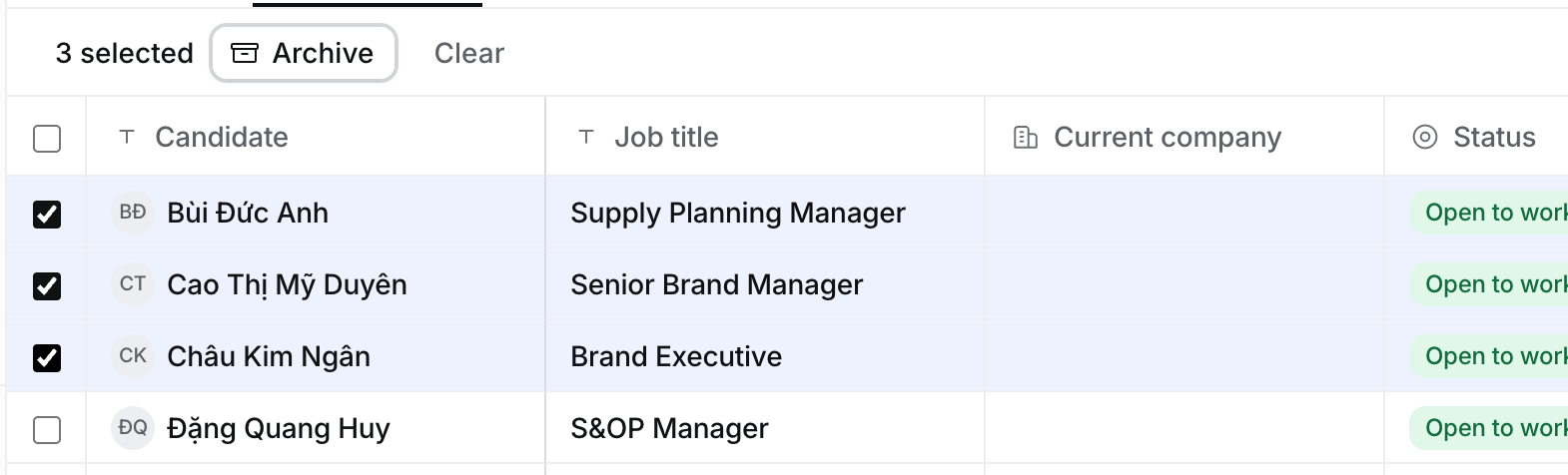 The bar above the table counts your selection and holds what you can do with it.
## What you can do
| Where | Actions |
| - | - |
| **Candidates**, **Contacts**, **Companies**, **Jobs** | **Archive**, or **Restore** on the **Archived** tab |
| A Job's **Pipeline** in list layout | **Move to stage**, which lists only the stages the selected applications share |
| A Job's **Pipeline › To review** | **Progress to Long list** and **Reject** |
| A Job's **Find candidates › To review** | **Keep on Long list** and **Skip** |
| **Tasks › To review** | **Approve** and **Deny** |
## Find and restore archived records
**Candidates**, **Contacts**, **Companies** and **Jobs** end their view tabs with **Archived**. It lists what's archived, with the day and the person who archived each one.
1. Select **Archived**.
2. Select **Restore** on a row, or tick several rows and select **Restore** in the bar.
3. Select a view tab, such as **Companies**, to go back.
Archived records are read only until you restore them.
## Reject several applicants
1. Open the Job's **Pipeline** tab, then **To review**.
2. Tick the applicants and select **Reject**.
3. Under **Why reject these N?**, tick the reasons, such as **Too junior** or **Missing a must-have**, or write your own under **Other reason**.
4. Confirm. They move to **Rejected**, where **Undo** brings them back today.
Flo learns from the reasons when it suggests changes to the ideal candidate. See [How to review applicants](/guides/how-to/review-applicants).
## Troubleshooting
* **Merge instead of archiving?** The company looks like another one you have. See [How to find and merge duplicates](/guides/how-to/find-and-merge-duplicates).
* **No checkboxes.** Today, Placements and the board layout don't take a selection. Switch the Pipeline to list layout.
* **"These applications share no stage."** The selected applications are on Jobs with different rounds. Select applications from Jobs with the same rounds.
* **No Add to job in the bar.** Add a candidate to a Job from their own page.
## Related
* [How to import candidates](/guides/how-to/import-candidates)
* [How to review applicants](/guides/how-to/review-applicants)
This documentation is built and hosted on [Mintlify](https://mintlify.com), a developer documentation platform.
The bar above the table counts your selection and holds what you can do with it.
## What you can do
| Where | Actions |
| - | - |
| **Candidates**, **Contacts**, **Companies**, **Jobs** | **Archive**, or **Restore** on the **Archived** tab |
| A Job's **Pipeline** in list layout | **Move to stage**, which lists only the stages the selected applications share |
| A Job's **Pipeline › To review** | **Progress to Long list** and **Reject** |
| A Job's **Find candidates › To review** | **Keep on Long list** and **Skip** |
| **Tasks › To review** | **Approve** and **Deny** |
## Find and restore archived records
**Candidates**, **Contacts**, **Companies** and **Jobs** end their view tabs with **Archived**. It lists what's archived, with the day and the person who archived each one.
1. Select **Archived**.
2. Select **Restore** on a row, or tick several rows and select **Restore** in the bar.
3. Select a view tab, such as **Companies**, to go back.
Archived records are read only until you restore them.
## Reject several applicants
1. Open the Job's **Pipeline** tab, then **To review**.
2. Tick the applicants and select **Reject**.
3. Under **Why reject these N?**, tick the reasons, such as **Too junior** or **Missing a must-have**, or write your own under **Other reason**.
4. Confirm. They move to **Rejected**, where **Undo** brings them back today.
Flo learns from the reasons when it suggests changes to the ideal candidate. See [How to review applicants](/guides/how-to/review-applicants).
## Troubleshooting
* **Merge instead of archiving?** The company looks like another one you have. See [How to find and merge duplicates](/guides/how-to/find-and-merge-duplicates).
* **No checkboxes.** Today, Placements and the board layout don't take a selection. Switch the Pipeline to list layout.
* **"These applications share no stage."** The selected applications are on Jobs with different rounds. Select applications from Jobs with the same rounds.
* **No Add to job in the bar.** Add a candidate to a Job from their own page.
## Related
* [How to import candidates](/guides/how-to/import-candidates)
* [How to review applicants](/guides/how-to/review-applicants)
This documentation is built and hosted on [Mintlify](https://mintlify.com), a developer documentation platform.